AI translation features for your Zalo conversations
VN Translator is a Chrome extension that translates your Zalo Web conversations in real time. Incoming Vietnamese messages appear in English inside the chat window, and you write replies in English that are translated to Vietnamese before they are sent. It is built for business owners, importers and expats who use Zalo to work with Vietnamese contacts every day.
You need two things to get started: the Chrome extension installed in your browser, and a free VN Translator account.
STEP 1
STEP 2
Requires Google Chrome on Windows, Mac or Linux desktop · Free to install · No credit card
Read incoming Zalo messages in English
When a Vietnamese message arrives in your Zalo Web chat, VN Translator translates it and displays the English version directly in the conversation. You read the translation without leaving the chat window and without copying text into a separate tool.
This means you can follow a fast-moving conversation. A supplier sending revised pricing, a logistics contact confirming a pickup time and understand each message as it appears, in context.
- Works natively in the Zalo Web input
- Preserves your exact meaning and nuance
- Sends automatically on Enter
Incoming Vietnamese
Bên mình có thể hỗ trợ giao hàng tận nơi không?
Auto-translated
Can your side support door-to-door delivery?
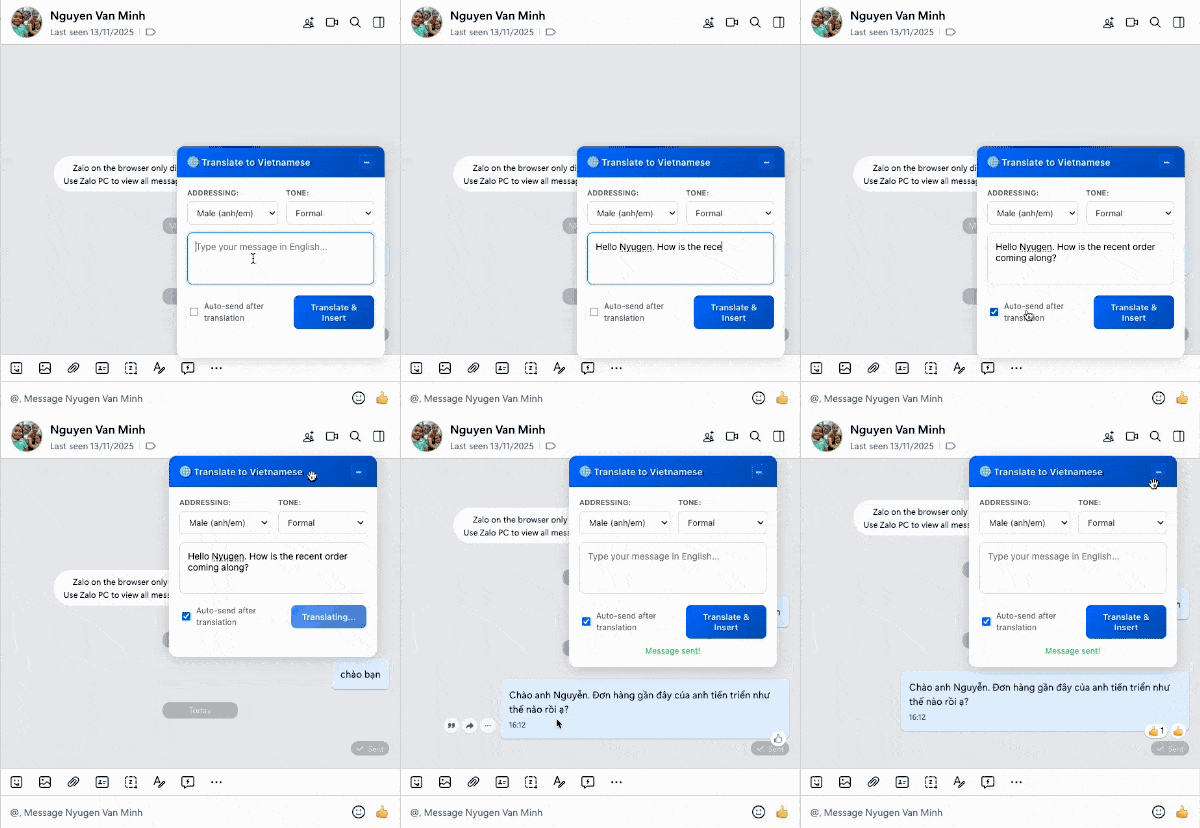
Write in English, send a Vietnamese reply
Type your reply in English. VN Translator translates it into Vietnamese and sends it in the chat. Your contact receives a message in natural Vietnamese, not the awkward phrasing that word-by-word translation tools often produce.
A practical example: your supplier in Ho Chi Minh City sends a quote for 500 units. You reply in English confirming the quantity and asking for the delivery date. Your contact reads a Vietnamese message that sounds like a normal business conversation.
Adjust tone and how you address someone
Vietnamese communication uses different levels of formality and gendered pronouns that change depending on who you are speaking to. Getting these wrong can sound blunt or disrespectful, even when the words are technically correct.
ADDRESSING
Male
Female
Group
TONE
Friendly
Neutral
Professional
Firm
VN Translator includes controls that let you set the tone and addressing context for each conversation. You can choose between casual, neutral and formal registers, and indicate how you would like to be addressed. The extension uses these settings to guide the translation so it fits the relationship. A friendly message to a colleague, a formal reply to a new business contact.
These controls help guide the translation. They are not a guarantee that every message will be culturally perfect, AI translation can still produce awkward phrasing, and important messages are worth having a Vietnamese speaker review.
A realistic business exchange
Here is how a typical sourcing conversation might look when you are using VN Translator. This is an illustration of the workflow, not captured product output.
You receive (in Vietnamese, translated to English by VN Translator):
“We can supply 500 units of the TM-200 at 340,000 VND each. Minimum order is 200 units.”
You type (in English):
“Thank you for the quote. Can you confirm the lead time for 500 units? We need delivery to our warehouse in District 7 by the 15th.”
Your contact receives (in Vietnamese, translated by VN Translator):
A natural Vietnamese message with appropriate formality based on your tone settings.
They reply (translated for you):
“Production takes 10 working days. We can deliver to District 7 by the 14th if you confirm the order this week.”
You reply:
“That works. Please send the invoice and bank details and we will transfer the deposit today.”
This exchange would normally require switching between Zalo and a translation tool for every message. With VN Translator, the entire conversation happens inside Zalo Web.
Get started in five minutes
- Install the extension — Add VN Translator to Chrome from the Chrome Web Store.
- Create your account — Sign up with your email or Google account. No credit card is needed to start.
- Generate your API key — In your VN Translator dashboard, create an API key. This is a short code that connects the Chrome extension to your account — think of it as a password that lets the extension use your translation allowance.
- Connect the extension — Paste the API key into the extension settings in Chrome.
- Open Zalo Web — Go to chat.zalo.me in Chrome and start a conversation. Incoming messages will be translated automatically.
If anything is not working as expected, check the setup and troubleshooting FAQ or contact support.
What it works with and current limitations
Designed for: Zalo Web (chat.zalo.me) running in Google Chrome on a desktop or laptop computer.
This exchange would normally require switching between Zalo and a translation tool for every message. With VN Translator, the entire conversation happens inside Zalo Web.
Requires: An internet connection for every translation. Messages are sent to an external AI service for translation and returned to your browser. VN Translator does not work offline.
Not currently supported: The Zalo mobile app and the installed Zalo desktop application. VN Translator works through the browser-based Zalo Web, not through native apps.
Language support: The primary supported use case is English–Vietnamese translation. Additional language pairs may be available — check the FAQs for the latest information.
AI translation accuracy: Translations are generated by an AI model and are generally good for everyday business communication. They are not guaranteed to be perfect. For contracts, legal documents or sensitive negotiations, have a fluent Vietnamese speaker review the message before acting on it.
Try it free, with your privacy protected
VN Translator offers a free trial with 5,000 characters of translation — enough to test it in a real conversation before deciding. No credit card is required. Paid plans start at a few dollars a month. See current plans and pricing.
Your messages stay private. VN Translator does not store your chat messages on its servers. Message text is sent to an external AI provider for translation and returned to your browser. For full details on what data is collected and how it is handled, read the privacy policy.
VN Translator is an independent product. It is not affiliated with, endorsed by, or connected to Zalo or VNG Corporation.
Ready to try it?
STEP 1
STEP 2
Have questions about setup, compatibility or pricing? Read the frequently asked questions. Already know how to translate Zalo messages? See the step-by-step business guide.